Many enterprises still run document capture on platforms chosen ten or fifteen years ago. Those systems were built around templates, zones, and trained classifiers, and they did their job on the standardized forms of the time. The documents organizations now want to automate are less uniform: contracts, financial filings, technical reports, and scanned packets with no fixed layout. That gap is the reason teams are looking at alternatives. Pulse is one of them, an intelligent document processing API that combines OCR, layout detection, and vision models for complex documents, and this article sets out how to evaluate any modern option on capabilities that can be verified.
Alternatives to legacy document-processing platforms
The search usually begins with a question about the best intelligent document processing options for an enterprise, or with a narrower one, such as whether there is an alternative to Kofax Express for a scanning workflow that has outgrown it. The useful first step is to be clear about what has changed in the technology, because that determines what to test.
How the approach differs. Legacy capture platforms generally rely on a model or template configured for each document type, with rules that map regions of a page to fields. Document processing solutions built on vision-language models work differently. They detect the components of a page, read each with a suitable model, and map content to a schema the user defines, without per-document training. Pulse’s intelligent document processing workflow follows this pattern for AI-native teams and enterprises: layout understanding, specialized OCR, reading order handling, table structure recognition, and vision models for charts and figures, with schema-based extraction applied on top.
What that changes in practice. Three differences tend to matter to a team planning a replacement:
- Set-up for new document types. A template-based system needs configuration and often labeled samples for each type. A zero-shot system needs a schema. Test this by timing how long it takes to get usable output from a document type neither system has seen.
- Tolerance for variation. Documents that differ slightly from the configured layout are where templates fail. Test with the same document type from several sources.
- Integration model. Older platforms are often complete applications with their own workflow and review screens. Newer options are frequently APIs that fit into systems a team already runs. Pulse is an API with Python and TypeScript SDKs, a CLI, and an MCP server, and it can be called from an existing capture or workflow system for the extraction step alone.
That last point means replacement does not have to be all at once. A team can keep its scanning, routing, and review tooling and send documents to a modern extraction API, then retire the older components as confidence grows.
How to compare candidates. Compare replacement options on capabilities that each vendor documents and that a trial can confirm:
- Document coverage: Results on your own hardest document types.
- Structure: Tables, forms, checkboxes, and handwriting returned as structured data.
- Traceability: A citation, bounding box, and confidence score for each value.
- Deployment: Hosted, VPC, on-premise, or air-gapped, matching your requirement.
- Compliance: Certifications and agreements your organization needs.
- Pricing: Published rates, and total cost at your volume.
Pulse’s entries are published: citations and confidence scores on every element, hosted and private deployment including air-gapped on Enterprise plans, SOC 2 Type II and ISO 27001 certification, a HIPAA Business Associate Agreement, and self-serve pricing that starts free. Rankings of vendors against legacy platforms are easy to find and hard to substantiate, so no ordering is offered here. A two-week trial on real documents will say more than any of them.
Complex table extraction alternatives
Tables are where the difference between tools is largest, and where teams most often go looking for something new. Pulse’s table structure recognition and parsing is built for this case, extracting the structure of complex tables along with their contents.
The question is usually framed as a trade-off. Teams that have tested several data extraction tools want comparable accuracy at a reasonable price, which points to the three criteria that matter: accuracy, workflow fit, and cost.
Accuracy means structure. Judge table extraction by whether structure survives:
- merged cells returned as spans
- multi-level headers kept in their hierarchy
- tables that cross page breaks joined into one
- borderless tables recognized as tables
- every row present on large tables
- the same result from a scan as from a native PDF
A worked example.
The table below comes from a 53-page FDA advisory committee briefing document. Each cell in the two study-arm columns holds three values at once, a case count, a surveillance time, and a participant count in parentheses, and the efficacy column carries a confidence interval and a footnote marker.
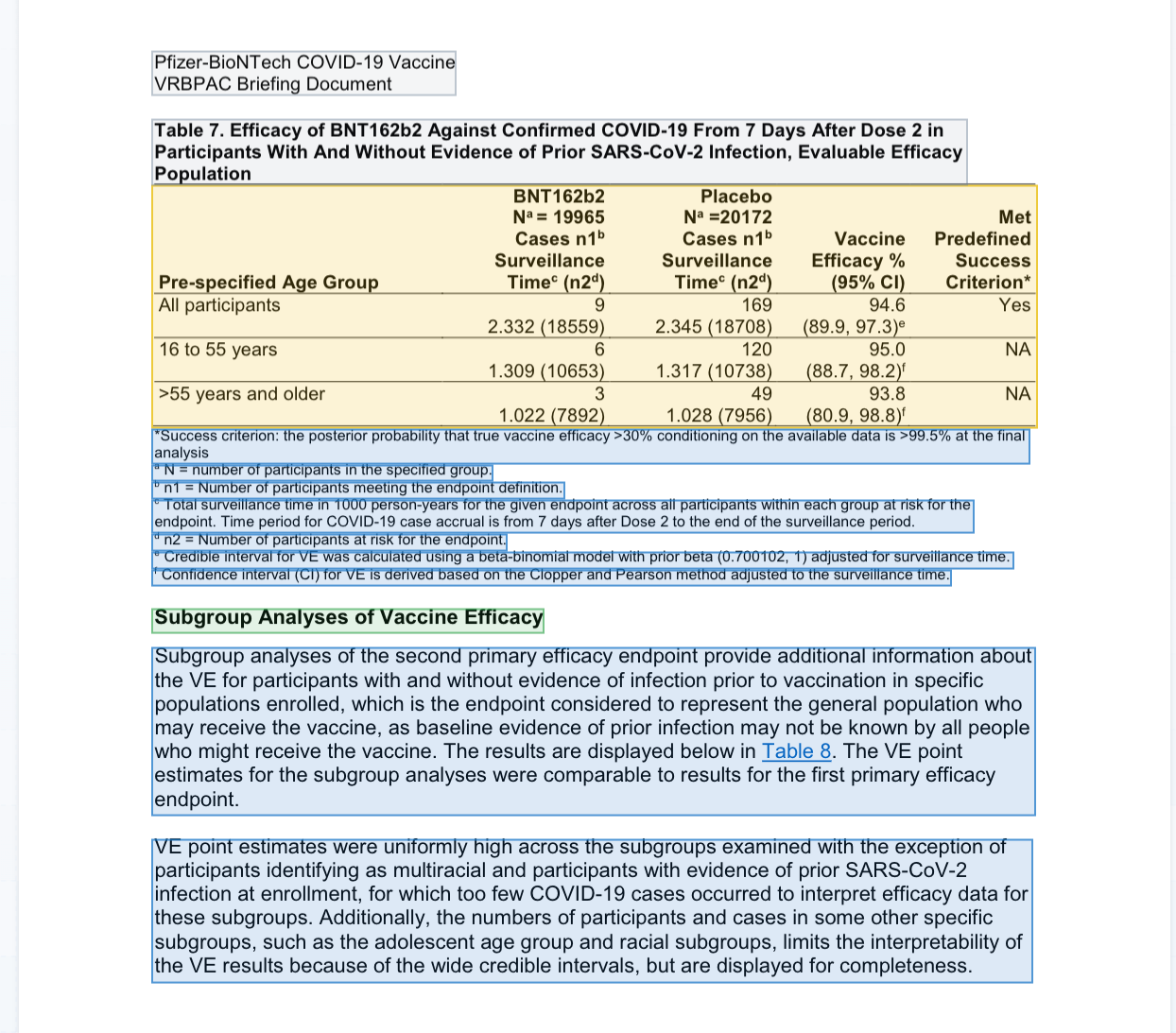
Pulse output on page 25 of the briefing document, with the caption, table, and each footnote detected as separate elements
Pulse returned the table with its header hierarchy and every compound cell intact:
| Pre-specified Age Group | BNT162b2 N^a = 19965 Cases n1^b Surveillance Time^c (n2^d) | Placebo N^a = 20172 Cases n1^b Surveillance Time^c (n2^d) | Vaccine Efficacy % (95% CI) | Met Predefined Success Criterion* |
| All participants        | 9 2.332 (18559)  | 169 2.345 (18708) | 94.6 (89.9, 97.3)^e | Yes |
| 16 to 55 years          | 6 1.309 (10653)  | 120 1.317 (10738) | 95.0 (88.7, 98.2)^f | NA  |
| >55 years and older     | 3 1.022 (7892)   | 49 1.028 (7956)   | 93.8 (80.9, 98.8)^f | NA  |
Three details separate this from a text-level extraction. The footnote markers stay attached to the values they qualify, so the interval for all participants is still labeled as a credible interval and the others as confidence intervals. The caption and the six footnotes come back as their own elements directly around the table, which is what allows them to travel with it. And the values in each compound cell arrive in a fixed order, so a downstream step can split them into separate fields with a simple rule.
Workflow fit includes licensing. The options range widely. Open-source libraries such as pdfplumber and PyMuPDF work well on digitally created PDFs with simple, ruled tables and cost nothing to license, though PyMuPDF is distributed under the AGPL, which has implications for commercial use that a legal team should review. They do not handle scans without a separate OCR step, and complex structure usually needs custom code. Cloud provider services cover scans and forms and charge per page by feature. Dedicated document intelligence APIs such as Pulse target the difficult cases, including merged cells, nested headers, multilingual tables, and tables spanning pages.
Cost needs current figures. Pricing and licensing terms change, so confirm each option’s current terms on its own pricing page before comparing. Include the cost of the engineering needed to reach acceptable output, since a free library that needs weeks of custom table logic is not free.
Test on your own tables. Comparative claims about table accuracy should rest on reproducible tests. Pulse publishes PulseBench-Tab, an open benchmark of 1,820 tables in nine languages with public data and scoring code, on which Pulse Ultra 2 scored 93.5% on the T-LAG metric. Because Pulse designed the benchmark, it should be treated as one input. The more reliable method is to take twenty of your own difficult tables, write down the expected output, run every candidate on them, and score the results by structure as well as by text. That test is small enough to complete in a day and specific enough to settle the choice.
Related reading