The Traceability Problem in Document AI
Document extraction has a provenance problem that becomes critical at enterprise scale.
When a pipeline parses a 300-page financial filing and returns a structured JSON object, the output is useful but fundamentally disconnected from its source. The number 1,847,392 appears in your database, and it came from somewhere in the document, but reconstructing exactly where, which page, which table, and which cell within a layout where the column header sits two rows above and the row label wraps across three lines, is often impossible after the fact.
Most extraction systems cannot answer that question because they serialize content into flat text or structured fields and discard the spatial information that would make the output verifiable. This is acceptable for simple workflows, but it creates a hard ceiling for enterprise use cases where auditability is not optional.
The underlying issue is architectural. Classical OCR pipelines operate at the glyph or line level and reconstruct document structure from reading-order heuristics. When that reconstruction produces a structured output, the mapping between the output and the original pixel coordinates is lost in the process, leaving no index, no pointer, and no way to walk backward from a value in the structured output to a bounding region in the source image.
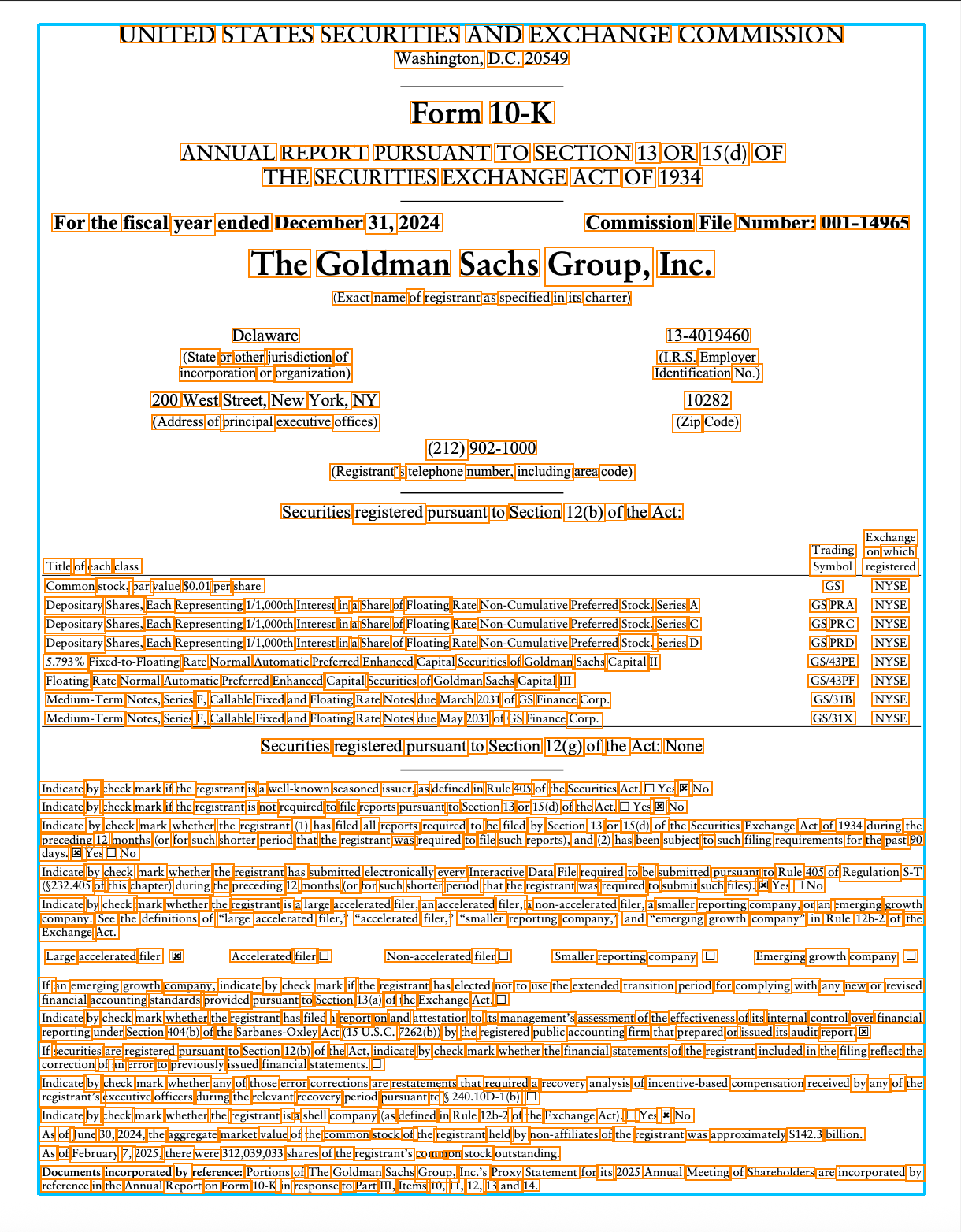
Pulse solves this by making spatial coordinates a first-class output rather than an internal byproduct, so every token in the extraction graph retains its geometric identity throughout the pipeline, from raw page rendering through layout analysis, table reconstruction, and structured output generation.
How the Coordinate System Works
Bounding boxes in the Pulse API use normalized coordinates: x_min, y_min, x_max, and y_max expressed as fractions of the page's pixel dimensions, paired with a zero-indexed page field. Normalization decouples the coordinates from any specific rendering resolution, so the same bounding box values remain valid whether you are rendering the document at 72 DPI for a web viewer or at 300 DPI for a print pipeline.
To convert to pixel coordinates for a specific rendering, you multiply each normalized value by the rendered page's pixel dimensions in the corresponding axis. A word with x_min: 0.612 on a page rendered at 2,550 pixels wide maps to pixel column 1,560, giving you the exact horizontal boundary to draw a highlight box, crop a region, or pass as a spatial grounding input to a downstream vision model. Because the normalized values are stable, you only need to store them once and can project them onto any rendering at query time.
Table Cell Geometry
Cell-level geometry is a harder problem than word-level bounding boxes because it requires the model to reason about structure that is often entirely implicit in the document. While finding a token and returning its bounds is relatively straightforward, PDFs do not natively encode table structure. At the rendering level, a table in a PDF is a collection of text runs and line segments with no semantic relationship between them, which means the extraction model must infer which text runs belong to which cells, where cell boundaries fall when grid lines are absent or incomplete, and how to handle cells that span multiple rows or columns.
Pulse returns bounding boxes that reflect the reconstructed visual layout of the cell rather than just the bounding box of the text within it. For a cell containing a short value like "42.7%", the bounding box covers the full cell region including whitespace, so the coordinates can be used to render a highlight overlay that aligns accurately with the original document. Merged cells, multi-line values, and tables that use whitespace rather than rules to delineate structure are all handled, and the bounding box always reflects the full geometric extent of the cell as it appears on the page.
Building Traceable Pipelines
The practical output of spatial coordinates in the API response is that you can build extraction pipelines where every data point has an address in the source document.
Source linking. Store bounding box coordinates alongside extracted values in your database. When a downstream process, a reviewer, or a compliance audit needs to verify a value, you can reconstruct the exact page region without re-running extraction. The coordinates are stable across multiple reads of the same document.
Overlay rendering. Use the normalized coordinates to draw highlight layers on top of document renderings in your UI. Because coordinates are resolution-independent, the same values work in a low-resolution thumbnail and a full-resolution review view.
Spatial filtering. Filter or validate extracted values based on where they appear on the page. A value appearing in the header region of a financial statement has a different semantic role than the same value appearing in a footnote. Coordinates let you encode that logic programmatically.
Confidence-weighted review queues. Combine the confidence score with bounding box location to prioritize human review. Route extractions from low-confidence regions in the document, rather than just low-confidence individual tokens, to the front of review queues.
Vision model integration. Pass bounding box coordinates directly to vision models or multimodal LLMs as grounding inputs. Instead of re-processing the entire document, crop the relevant region and pass it as a targeted image input with the extracted text as context.
Availability
Word and cell level bounding boxes are available now through the Pulse API. If you are an existing customer, the coordinates are already present in your API response with no configuration required. If you are not yet using Pulse, you can get started through our platform with up to 20,000 pages free. For full documentation on the bounding box response schema and integration patterns, visit our docs.