Open-source OCR and document parsers are free to download, which makes building a document extraction pipeline in-house look inexpensive at the start. The costs that matter arrive later, in the engineering time spent on the documents that do not parse, the infrastructure that sits behind the models, and the upkeep required as formats change. This article compares the full cost and technical fit of building with open-source components against buying a managed service, for engineering leaders who have to make that decision for a specific workload. Pulse, which provides document intelligence using OCR, layout detection, and vision models, serves as the managed example.
Total cost of ownership
A fair comparison counts everything on both sides and sizes it to the workload.
The first question is what the workload actually requires. Some workflows need classification and field extraction with confidence scoring, and not only layout parsing. A pipeline that converts clean PDFs to text for search is a small build. One that classifies mixed packets, extracts typed fields, scores confidence, and routes exceptions is several systems, and each has to be built and maintained.
In-house costs fall into four groups:
- Engineering: Initial build, plus continuing work on new document types and failure cases.
- Infrastructure: GPU and CPU capacity sized for peak volume, storage, and queues.
- Monitoring: Accuracy tracking, drift detection, alerting, and evaluation sets.
- Exception handling: Review tooling and the people who work the queue.
The hidden portion is mostly in the first and third groups. Building the first version is a bounded project. Maintenance is not, because the long tail of documents never ends: a new supplier format, a scanned fax, a table that splits across pages in a way the heuristics did not anticipate. Each one is a small piece of work, and together they amount to a standing team. Model upgrades add to it, since moving to a newer open-source model means revalidating everything against the evaluation set, assuming one has been built.
Managed service costs are simpler to state. Pricing is usually per page or per credit, with volume agreements at enterprise scale. Pulse’s self-serve plan is free up to 20,000 credits, and usage beyond that, like Enterprise volume pricing, is priced per credit according to the plan. Other vendors publish per-page or per-credit rates on their own pricing pages, and those should be read directly, since feature tiers change what a page costs. To the usage fee, add integration work, which is real but modest, and whatever review effort remains.
A worked example at one volume. Pulse prices usage in credits, which makes the managed side easy to size. Parsing costs 1 credit per page and schema extraction costs 1 credit per page read, and what a credit costs depends on the plan.
- 100,000 pages parsed. Credits: 100,000 a month.
- 100,000 pages parsed and extracted to a schema. Credits: 200,000 a month.
- 1,000,000 pages parsed and extracted to a schema. Credits: 2,000,000 a month, the range where Enterprise volume pricing applies.
The in-house side has to be filled in with a team’s own numbers, and the formula is short: the loaded cost of the engineers who build and maintain the pipeline, plus GPU and storage for peak volume, plus the people who work the exception queue. Multiply the managed credit count by the per-credit rate of the plan under consideration and set the two side by side. At volumes in the low hundreds of thousands of pages a month, the managed figure usually sits well below the fully loaded cost of a single engineer, so an in-house build only competes if it needs almost no ongoing attention. At millions of pages a month, enterprise volume pricing and a serious in-house estimate both deserve a careful comparison.
How the comparison moves with volume. At low volume, in-house fixed costs dominate, and a managed API is almost certainly cheaper. At very high volume with simple, stable documents, in-house unit costs can fall below API pricing, provided the team already exists. Between those points, the answer depends on document complexity more than page count, because complexity is what drives engineering and exception-handling cost. Cost per correctly extracted document, including review, is a more useful unit than cost per page.
Technical fit by workload
Cost only matters among options that do the job, so fit should be assessed on the team’s own documents. The comparison below describes where each approach tends to fit, and the right check is a test on representative files.
- Existing OCR such as Tesseract. Typical fit: Clean printed text where layout does not matter. What to test: Tables, multi-column pages, handwriting.
- Open-source parsers such as Docling. Typical fit: Native PDFs and teams able to operate models. What to test: Scans, merged cells, long documents, throughput.
- Commercial APIs. Typical fit: Varied or difficult documents, and a need for citations, confidence, and support. What to test: Accuracy on your hardest files, limits, cost at volume.
- Fine-tuned vision-language model. Typical fit: A narrow, high-volume document type with labeled data available. What to test: Gain over a commercial API on the same test set.
Three questions come up repeatedly.
When does it make sense to replace Tesseract? When the documents carry meaning in their structure. Tesseract recognizes text and word positions and does not reconstruct tables, so rows and columns have to be rebuilt with additional code. Once that code becomes the main maintenance burden, a system that returns structure directly is worth pricing. Pulse’s specialized OCR is combined with layout detection and table structure recognition, so tables come back with merged cells and multi-level headers intact.
The filing below shows the kind of page where that difference appears. It carries a stamp over the letterhead, typewriter entries inside a printed form, handwritten signatures and dates, and a notary seal, and Pulse returns each of those as a separate region with the form’s tables kept as tables. Rebuilding that structure from word positions is the custom code an in-house pipeline has to own.
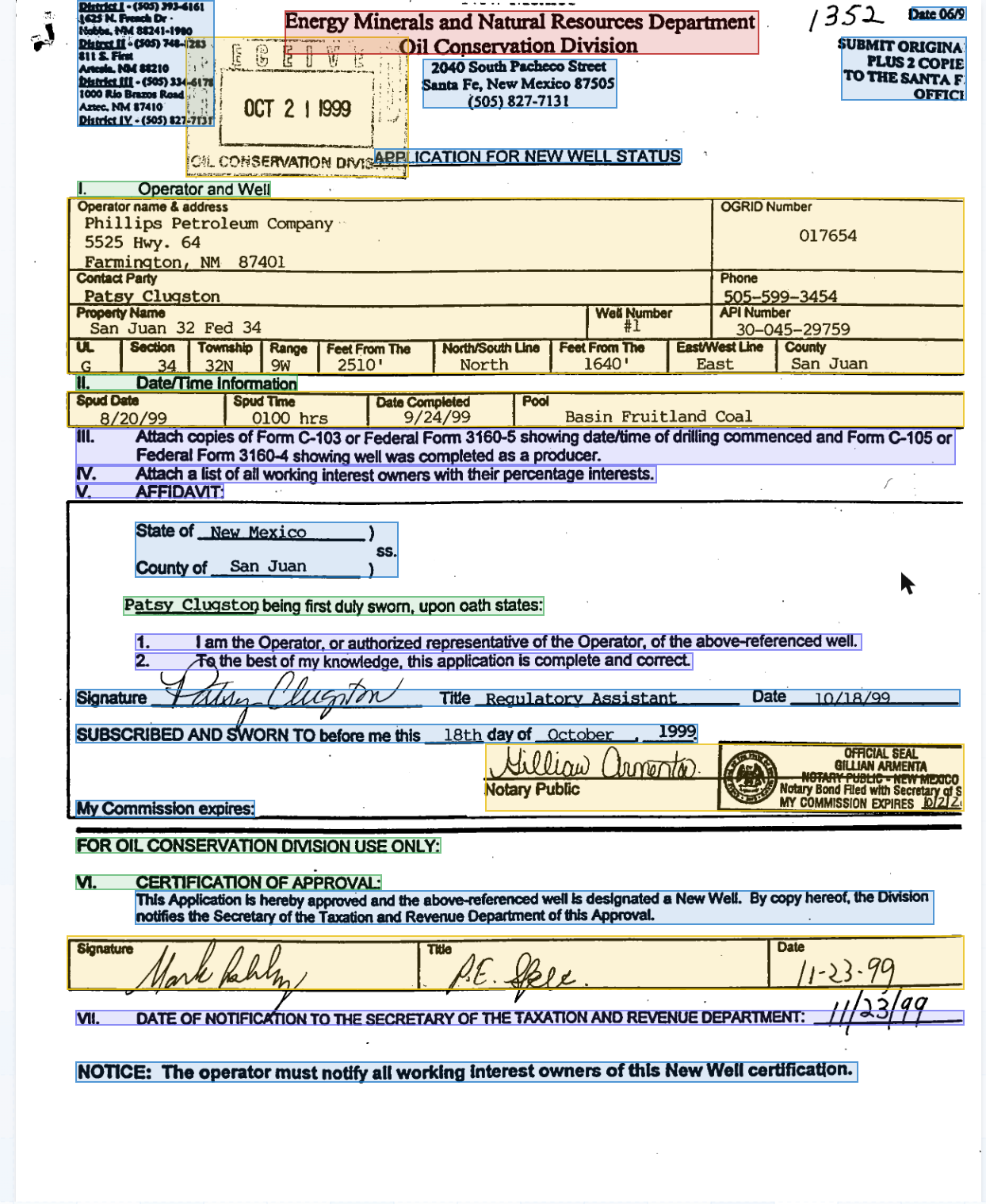
Pulse output on a 1999 regulatory filing, with the stamp, typed entries, affidavit text, signatures, and notary seal detected as separate regions
Open-source parser or commercial API? Run both on the same documents, with the same expected outputs and the same failure cases, and compare accuracy on required fields alongside the engineering time each needed to reach that result.
Is fine-tuning a vision-language model worth it? Treat it as one candidate among several. It requires labeled data, training infrastructure, and re-training as documents drift. Measure it against a commercial API on an identical test set before committing, since zero-shot extraction with a defined schema may already meet the need. Pulse applies a JSON Schema without labeled training samples, and offers custom fine-tuning on Enterprise plans for cases where a specific format warrants it.
Production build-versus-buy decision
Engineering leaders can structure the decision around evidence. Public benchmarks of open-source document parsers exist for this purpose, and the same idea applies to managed options: test first, then decide. Pulse’s document vision pipeline is a concrete managed approach to include in that test.
Four factors carry the decision:
- Document complexity. Simple, stable, digitally native documents favor building. Varied layouts, scans, complex tables, and handwriting favor buying.
- Security needs. A requirement to keep documents in-house once forced a build. Managed products that deploy in a VPC or on-premises have changed that, and Pulse offers both, along with air-gapped deployment.
- Integration effort. Compare the work of connecting an API and SDK with the work of building queues, retries, and scaling around self-hosted models.
- Ongoing ownership. Ask who will maintain accuracy in two years, and whether that team is funded.
In practice, organizations whose documents are peripheral to their product tend to buy, and those for whom a narrow document type is the core of the business sometimes build. Many do both, keeping a simple in-house path for easy documents and sending difficult ones to a managed service.
The recommendation here is conditional. Build if the workload is narrow and stable, the test results show open-source components meeting the accuracy requirement, and a team is committed to operating the pipeline. Buy if the documents are varied or hard, if citations and confidence scores are needed for review, or if the engineering capacity is better spent elsewhere. In both cases the decision should rest on a measured comparison using the team’s own documents.
Related reading