A spreadsheet is one of the highest leverage items in any enterprise workflow. It’s incredibly easy to hide the deciding fact in a row, a formula, a long definition, or a diagram beside the table. This traditionally has required expert human usage from financial institutions (banks, consulting companies, etc.). However, giving an agent the workbook is only the beginning, they also need a readable way to find that evidence and connect it to the task.
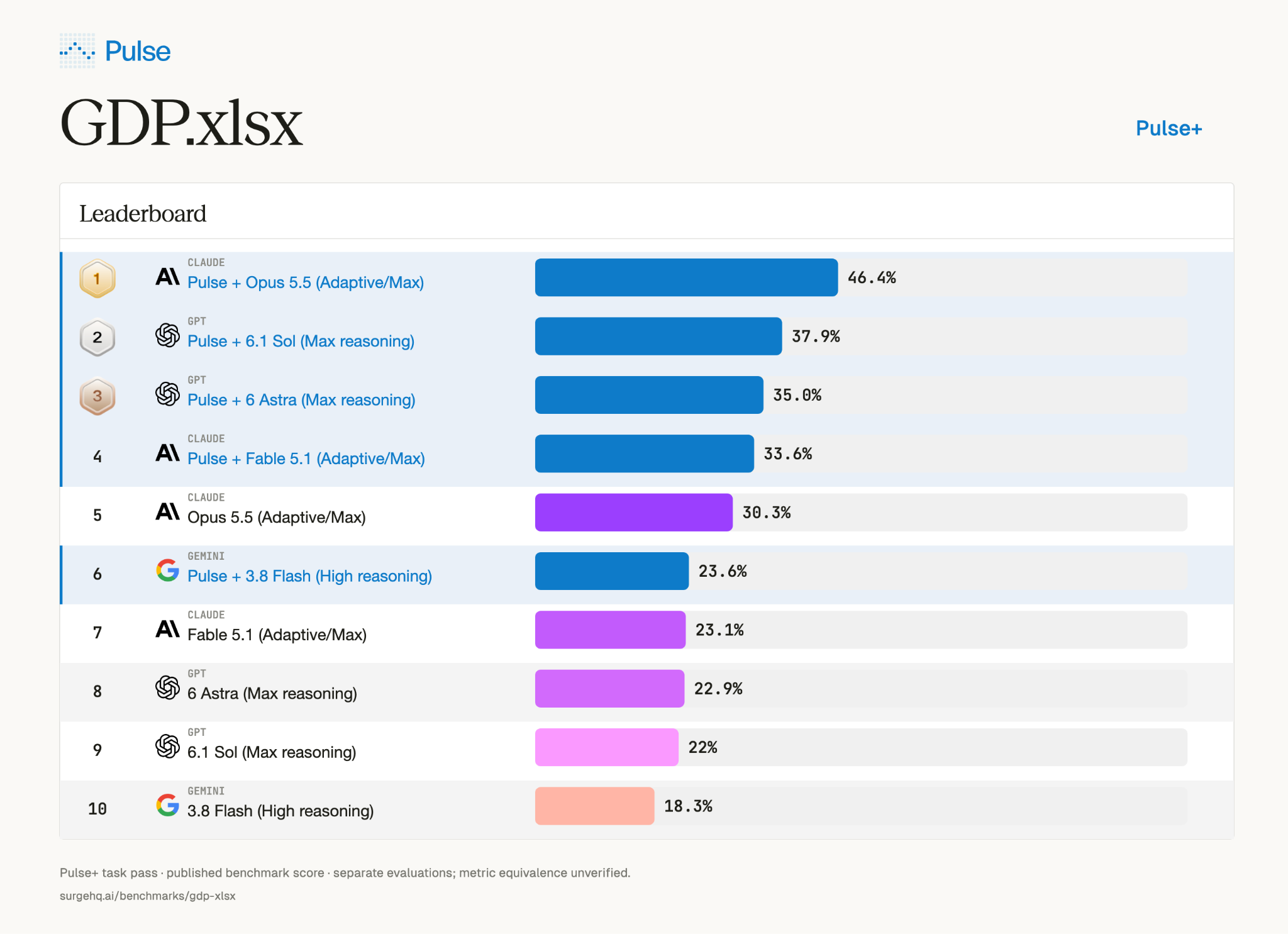
The Pulse research team evaluated Pulse’s spreadsheet extraction pipeline on Surge’s GDP.xlsx benchmark using the benchmark’s OpenHands agent harness. Our latest reported task-pass rates are 46.4% for Claude Opus 5.5, 37.9% for GPT-6.1 Sol, 35.0% for GPT-6 Astra, 33.6% for Claude Fable 5.1, and 23.6% for Gemini 3.8 Flash.
The research question was practical: how should spreadsheet evidence be extracted and delivered so an agent can use it effectively?
Our approach
Pulse is built for high-fidelity spreadsheet extraction. That means preserving the structure and meaning of a workbook alongside its visible values.
Our pipeline retained hidden rows, columns and sheets with their visibility flags; source formulas and available cached values; defined names, merged ranges and comments; and formatting cues such as number formats and strikethrough. Complete text-box and drawing content remained available. Sheet names and cell coordinates connected each record to its source, helping agents distinguish a value, a calculation, an annotation and an exclusion signal.
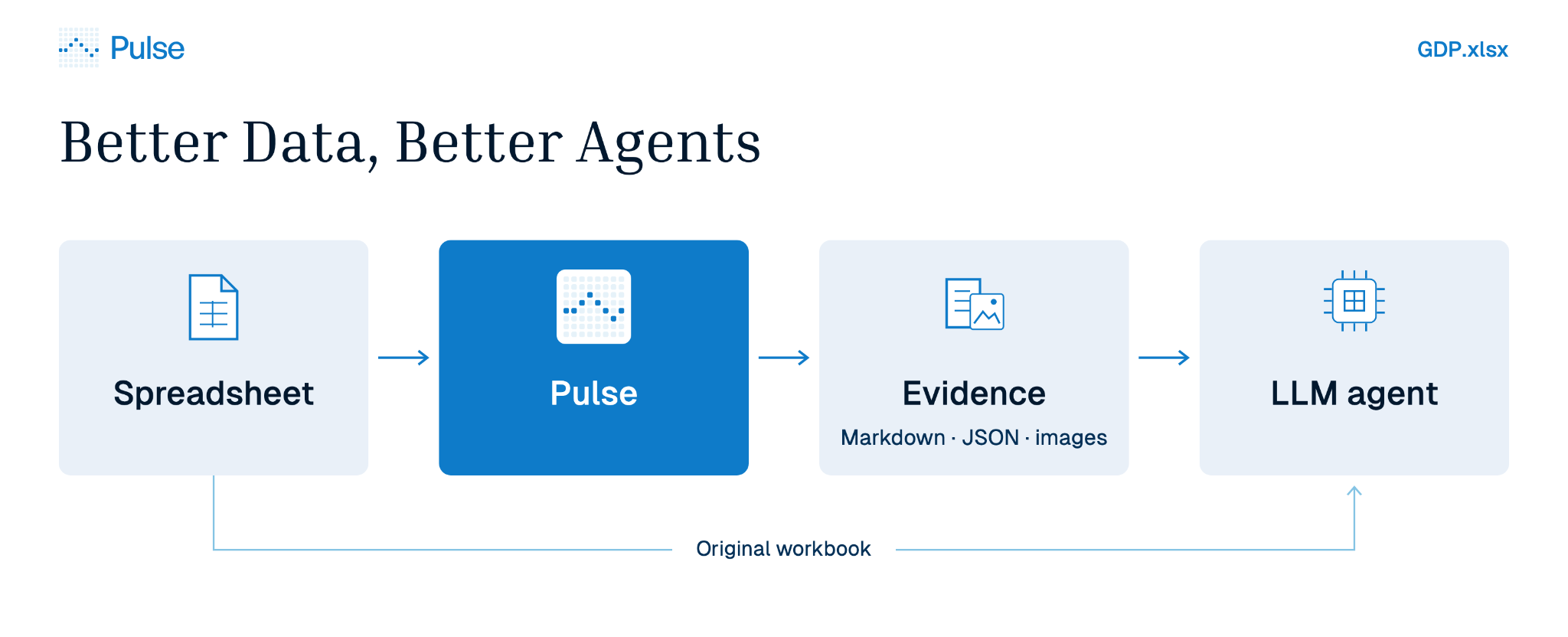
Every agent received this evidence at the start as Markdown, structured JSON and a searchable SQLite index.
Long extracts were split into readable pages with continuation cursors, while complete records remained accessible. Agents could search for a relevant sheet, retrieve a particular range or inspect a full definition without placing the entire workbook into every request.
Visual evidence followed the same principle. Pulse extracted embedded pictures, prepared chart reconstructions and delivered image overviews with readable crops as actual model image inputs. The multimodal agent could inspect those images alongside the extracted tables and their source references.
OpenHands then provided the tools for further inspection, calculation and answer generation at each model’s maximum supported reasoning setting. The benchmark’s native grader evaluated the result.
Engineering diagram tasks
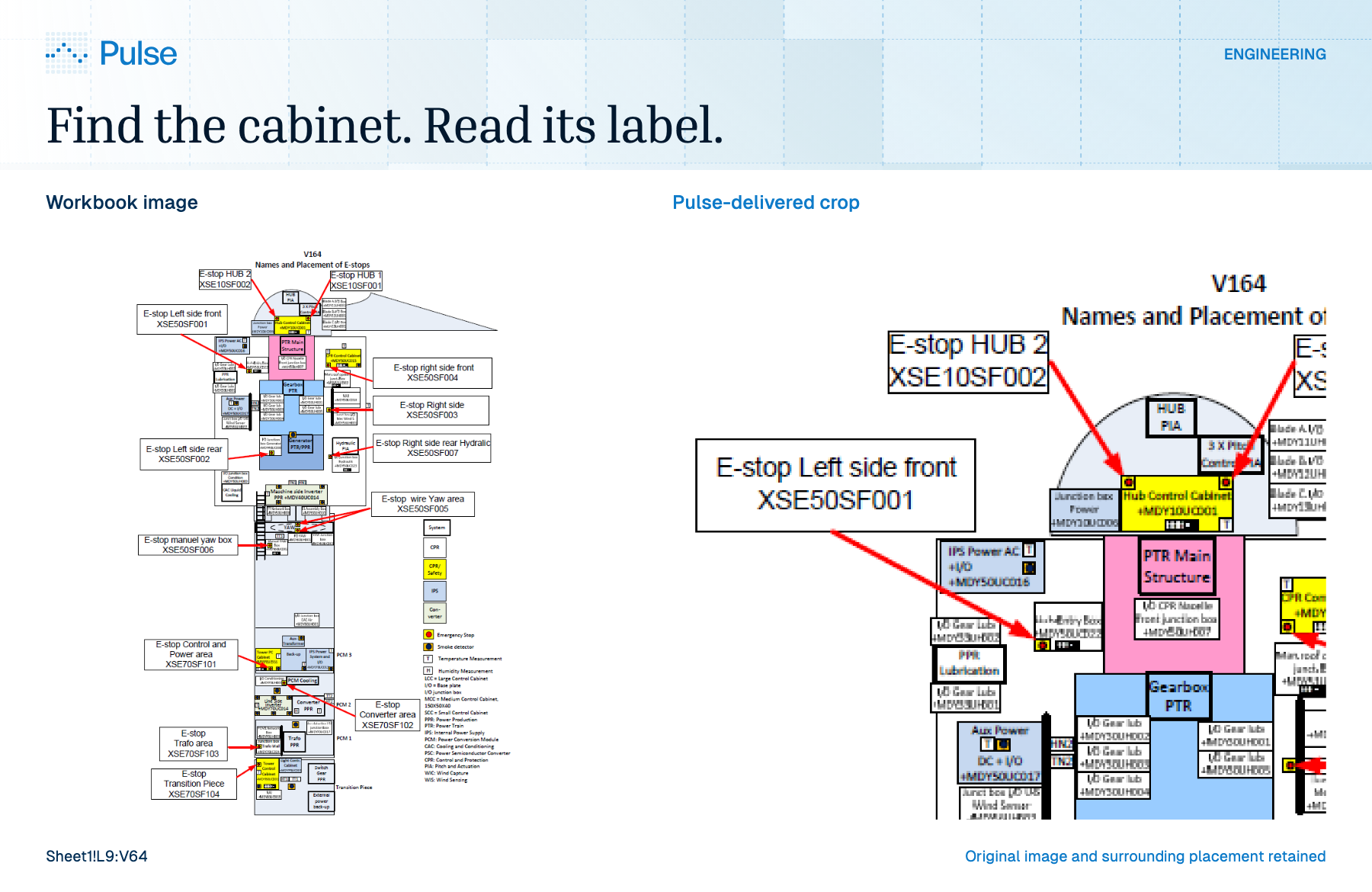
The public engineering example asks for a DC auxiliary power cabinet’s location and number. Its equipment diagram contains small labels and connections that need to remain readable.
Pulse supplied an overview and four crops covering the diagram. The resulting answers show why this evidence matters:
One note: Gemini found the correct cabinet but omitted the required sheet attribution-a useful distinction between finding the evidence and completing the answer.
Finance tasks
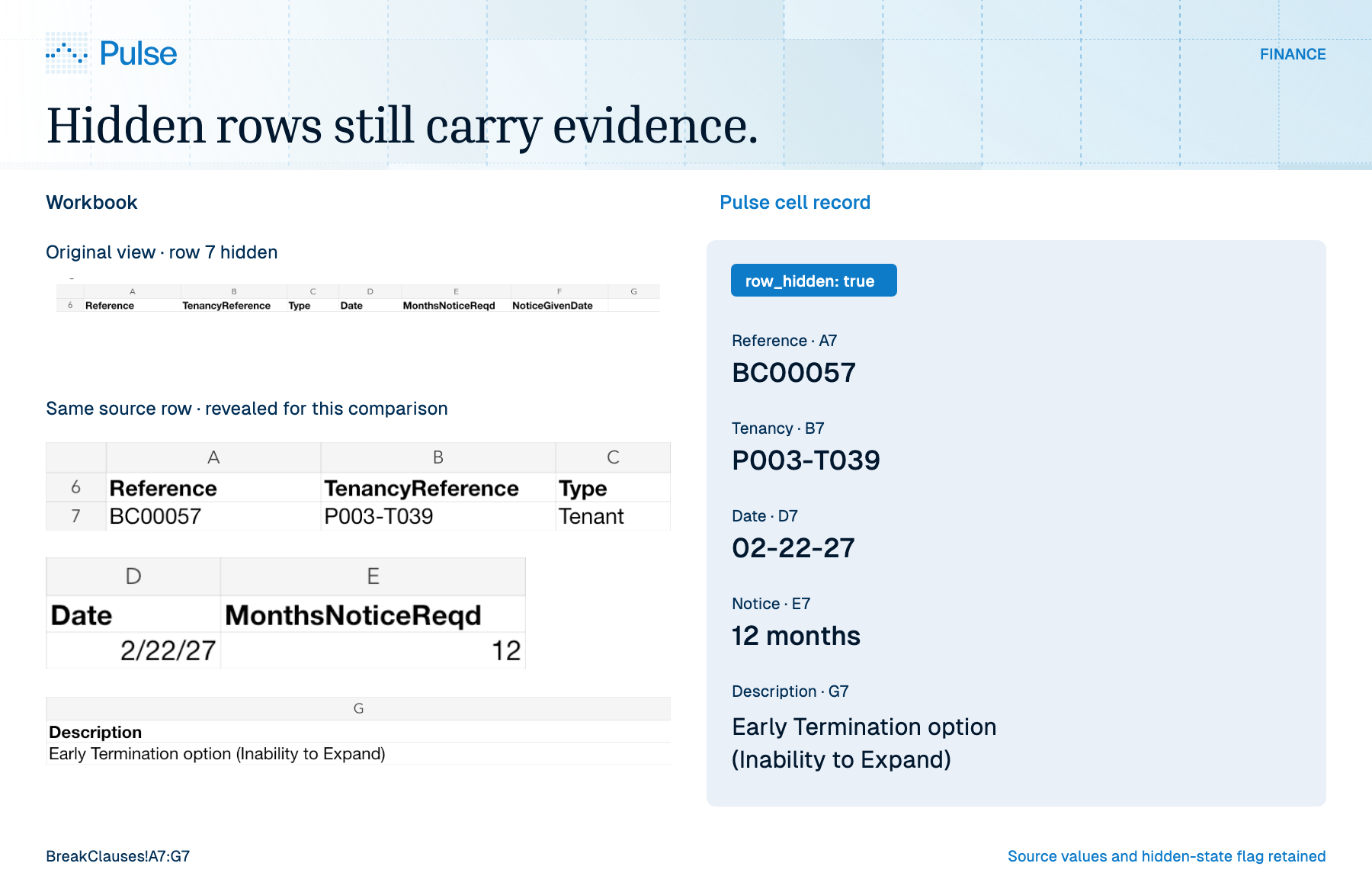
The public finance example requires a rental forecast across multiple sheets, including actionable tenancy breaks. Row 7 on the BreakClauses sheet is hidden.
Pulse’s extraction preserved the complete record: its reference, date, notice period, description, coordinates and hidden-row attribute. Those fields need to travel together for the agent to assess whether a break belongs in the forecast.
Healthcare tasks
The healthcare example connects form designations, codes and accepted values. The W1_OUTSI record includes a long definition that needs to remain attached to its form and allowed values.
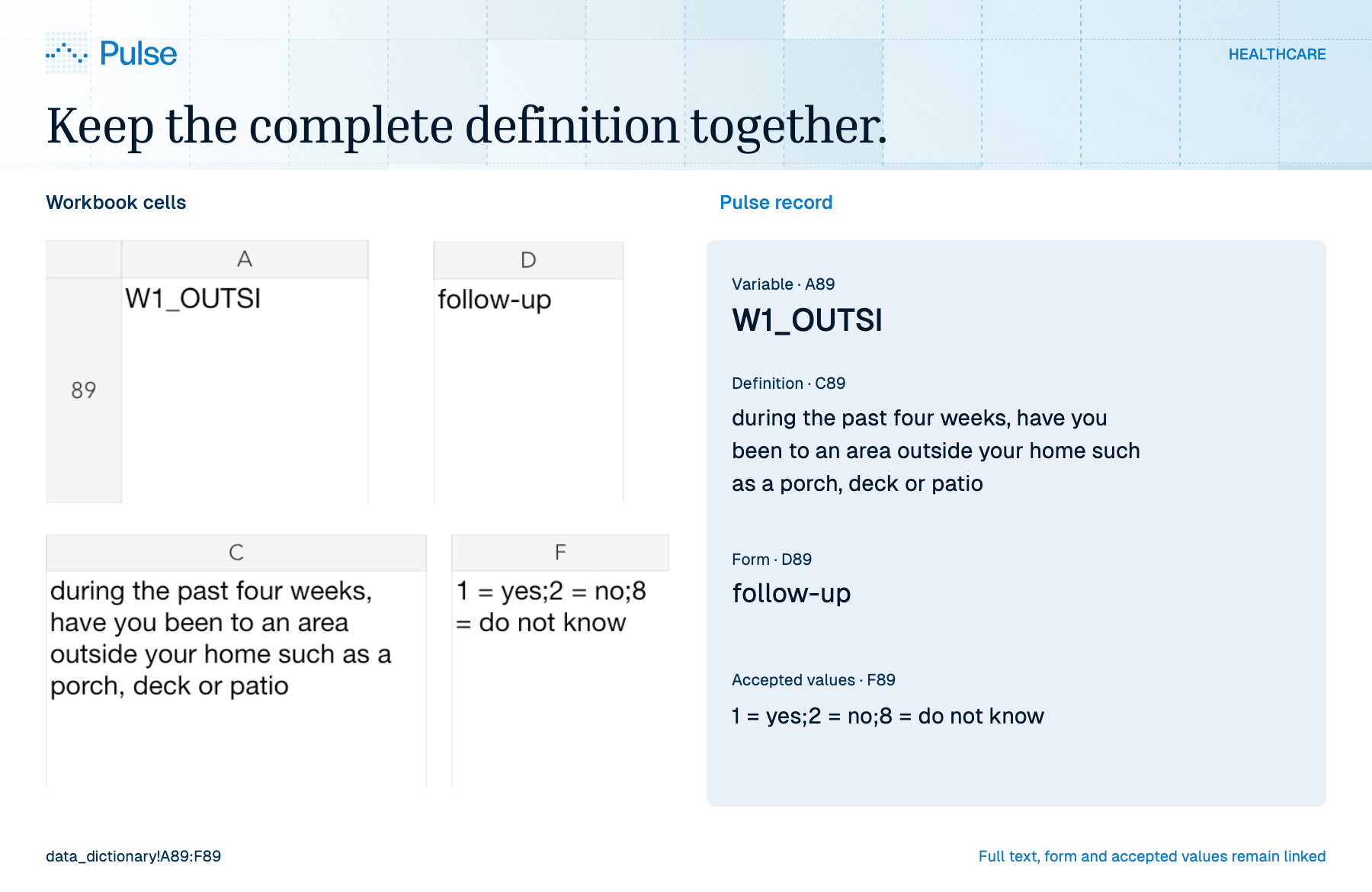
Pulse kept those fields together. All five audited attempts nevertheless earned 57.14% rubric credit. This exposes a remaining reasoning challenge: access to complete evidence does not ensure that an agent selects every applicable field or interprets the question correctly.
Better data belongs in the agent’s workflow
Spreadsheet extraction is part of the reasoning workflow. Pulse brings that evidence into the agent’s working context before it begins solving the task. The agent can then use its tools to investigate, calculate and verify against a richer representation of the workbook.
Sources: Surge GDP.xlsx · Public examples · Evaluation code