Every accounts payable organization has the same goal on its roadmap: straight-through processing, where an invoice arrives, gets read, gets matched, and gets routed for payment without a human touching it. And in almost every AP organization, the actual number of invoices that flow through untouched is close to zero. Teams that process thousands of invoices a month describe the same reality. The OCR layer captures something on every invoice, but not enough of it, and not reliably enough, for anyone to trust the output without review. So every single invoice lands in a queue, and a team works that queue by hand, and the automation that was supposed to remove the manual work has instead become a system for organizing it.
The gap between the promise and the reality is not a tuning problem. It comes from a set of specific, structural failures in how conventional invoice capture works, and they are worth naming precisely.
Line items are where capture goes to die
Header fields are the easy part. Invoice number, invoice date, total amount due: these appear in predictable places and most capture tools find them most of the time. The line items are a different story. Line item tables vary in column structure from vendor to vendor, wrap descriptions across multiple rows, embed subtotals and discounts mid-table, and continue across page breaks. Legacy capture tools routinely return partial line item data, and partial is functionally useless for three-way matching, because a match against an incomplete item list fails and the invoice falls to a human anyway. A capture system that gets 80 percent of line items is not 80 percent of the way to straight-through processing. It is zero percent of the way there.
The routing data is not on the invoice
The second failure is subtler. The fields that determine where an invoice goes, the purchase order reference, the requester, the internal cost code, are frequently not on the invoice at all. They live in the email that carried the invoice, in the subject line, in a sender's signature block, or in a handwritten note added during intake. A capture pipeline that only ever sees the invoice PDF is blind to the information that routing actually depends on. Extraction has to operate on the full intake package, not the single document, and it has to preserve which source each field came from.
Vendor names are a matching problem, not a reading problem
The third failure is supplier identification. An invoice says one thing, the vendor master says another, and the difference between a trade name and a registered legal name is enough to break an automated match. Reading the name off the page is not sufficient. The extraction layer needs to produce output clean and structured enough that normalization against the vendor master becomes reliable, and it needs to flag low-confidence matches instead of guessing silently. Silent wrong guesses are worse than gaps, because they route money toward the wrong account before anyone looks.
Confidence is the mechanism that unlocks the bypass lane
Straight-through processing does not require perfect extraction. It requires extraction that knows when it is right. If every extracted field carries a calibrated confidence score and a bounding box grounding it to the source page, the pipeline can split into two lanes: invoices where every critical field clears the threshold flow through untouched, and only the genuine exceptions reach the queue. That is the difference between automation that assists a manual process and automation that replaces one. Pulse was built around this principle, which is why every value it extracts arrives with coordinates, structure, and a confidence score calibrated against real-world accuracy rather than model optimism.
Below is a supplier receipt billed to a state corrections department, released through a public records request with the supplier identity redacted before release. It appears first exactly as it arrives and then again after processing through Pulse. Setting the two side by side makes the segmentation pass visible, including the fields that came back empty because the page never carried them.
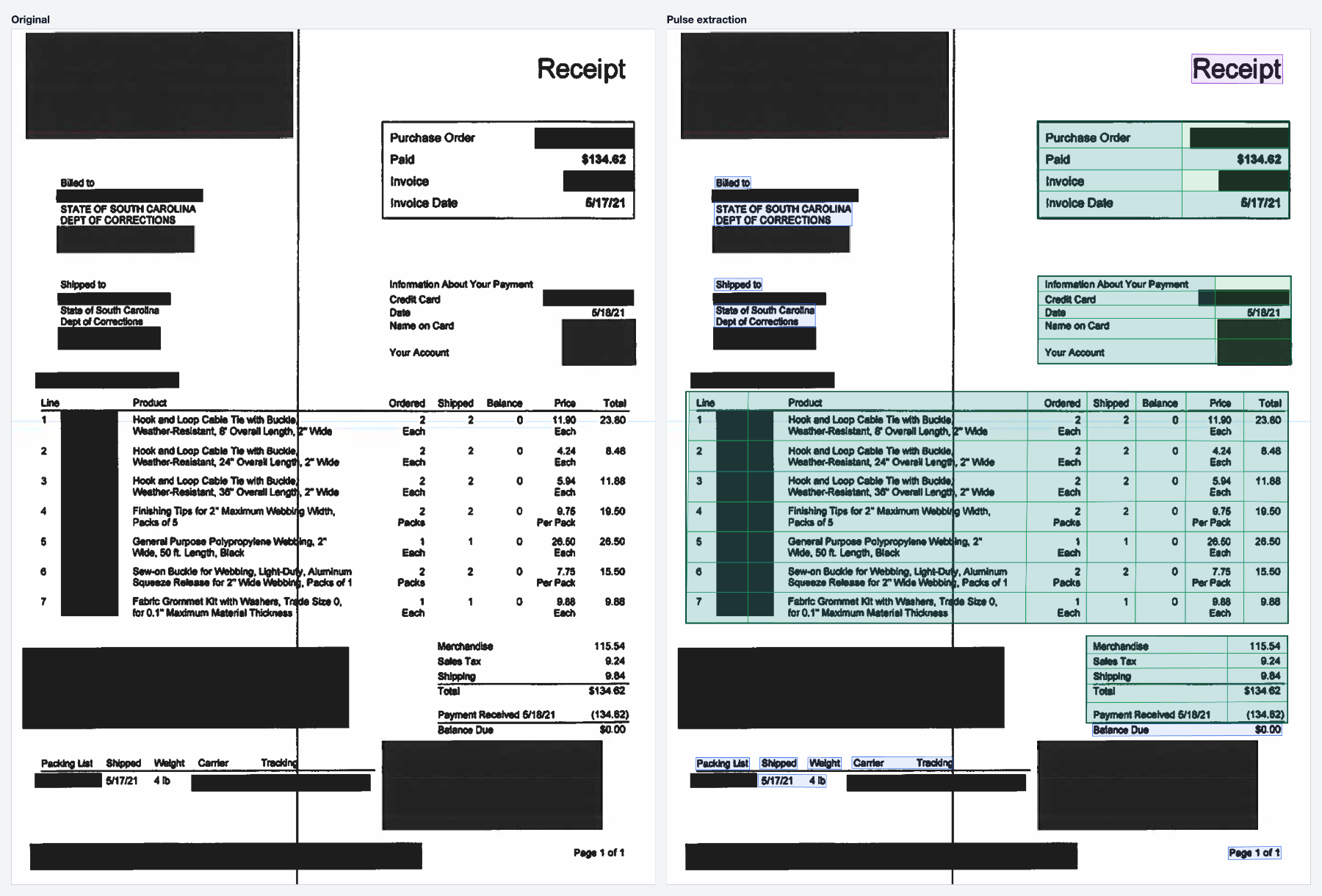
The AP teams that get closest to straight-through processing are not the ones with the most aggressive automation targets. They are the ones that fixed the extraction layer first, measured field-level accuracy against their own document mix, and then let the confidence scores decide which invoices still deserve human eyes. The queue gets shorter from the bottom, one reliably extracted field at a time.