The best on-premise document AI platform for a regulated organization is one where every processing step, including model inference, can run inside the organization's own boundary, with documented controls an auditor can check. Pulse runs in a customer's VPC, on-premises or in air-gapped environments on Enterprise plans, with zero data retention, bring-your-own-key encryption and SOC 2 Type II and ISO 27001 certification, and its parsing runs on its own vision-language models. Hyperscience and ABBYY are established choices for on-premise capture, newer API vendors such as Reducto, LlamaParse and Unstructured now offer VPC and self-hosted options, and Azure containers and the open-source Docling suit teams that want to assemble their own stack. The differences are in the details below.
This guide is published by Pulse, which appears in it. Descriptions of other products are based on their public documentation at the time of writing, and capabilities change, so confirm current details with each vendor.
On-premise, VPC and air-gapped are not the same
Vendors use these terms loosely, so it is worth fixing their meaning before comparing anything:
- VPC deployment runs the software in the customer's own cloud account, behind its network controls. Some vendors call a dedicated instance in their own cloud a VPC, which is a different arrangement.
- Hybrid VPC keeps documents and results in the customer's account while the vendor's infrastructure does the processing, so documents still leave the boundary to be processed.
- On-premises runs the software in the customer's data center, which may still have internet access.
- Air-gapped means no route to any external network. Models, updates and patches arrive as offline bundles, and nothing can call out to a hosted model.
The last point is the one that most often disqualifies a product. A platform that sends pages to an external language model for part of its processing cannot run air-gapped, whatever its deployment page says, unless that model can also be hosted inside the boundary.
Worked example: a handwritten diligence request list
Sensitive documents are rarely clean. A due diligence request list that has been printed, marked up by hand and scanned is typical of what a legal or deal team cannot send to a public API.
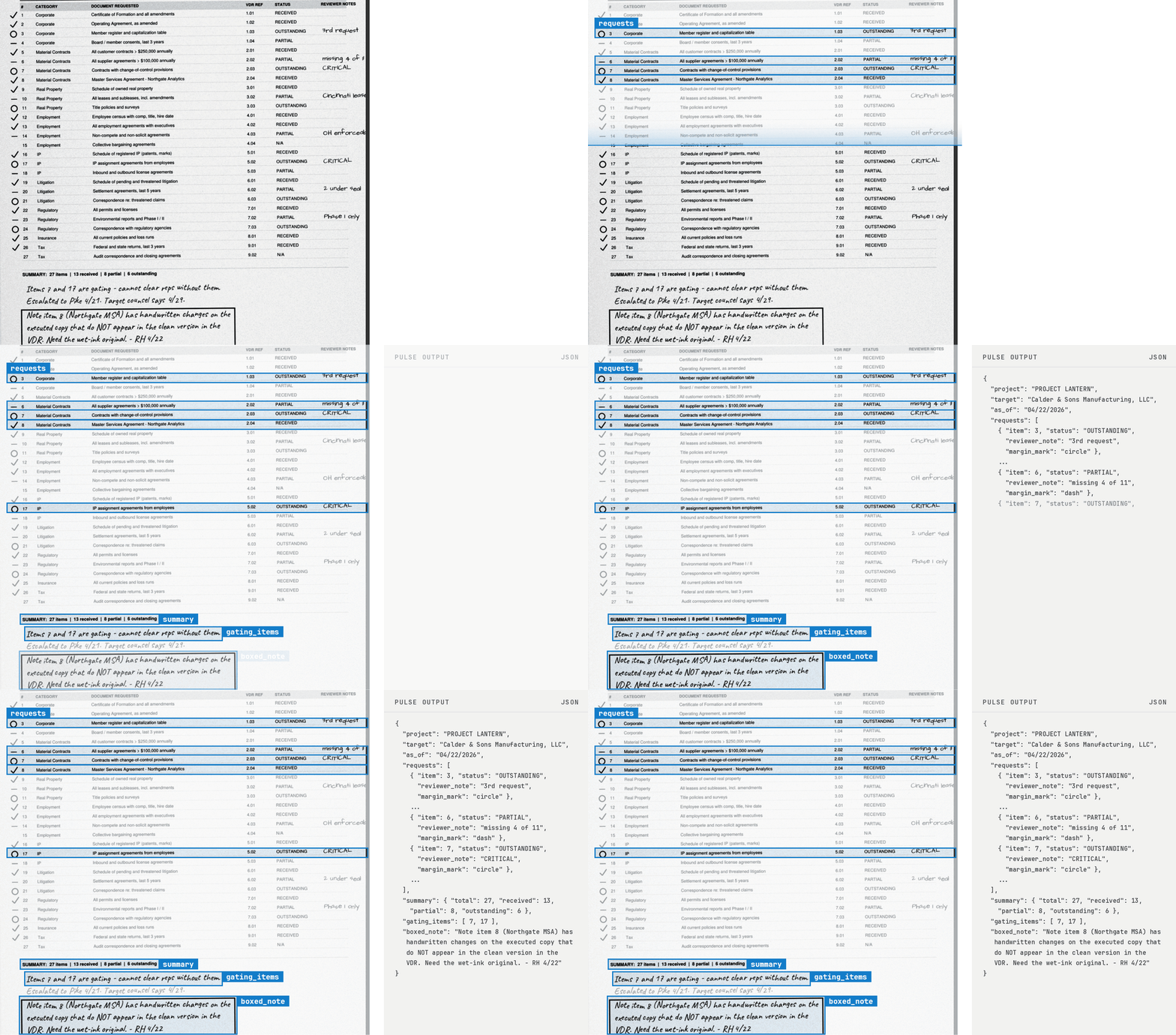
Pulse output on a marked-up diligence request list, with the rows, the summary line and the handwritten notes detected and returned as fields
Given a schema for each request row, the summary and the handwritten notes, Pulse returned all 27 rows with their data room reference, status and margin mark, along with reviewer notes such as “missing 4 of 11” against the supplier agreements and “CRITICAL” against the change-of-control contracts. It returned the summary of 13 received, 8 partial and 6 outstanding, and transcribed the boxed handwritten note in full. Every value is tied to its location on the page, so a reviewer can check it against the scan without the scan leaving the environment where it was processed.
The best on-premise and VPC document AI platforms, compared
1. Pulse
Pulse is an enterprise document intelligence platform that parses complex documents into Markdown, structured JSON, tables and chart data with a bounding box on every element. Enterprise customers can deploy it in their own VPC, on-premises or air-gapped, using Docker or Kubernetes across the major cloud providers, with zero data retention, data residency in a chosen region, bring-your-own-key encryption, SAML or OIDC single sign-on and granular role-based access. Pulse is SOC 2 Type II and ISO 27001 certified, signs a HIPAA Business Associate Agreement on Enterprise plans, does not train on customer documents, and has processed more than 1 billion pages. Best for regulated enterprises that need high accuracy on complex documents inside their own boundary.
2. Hyperscience
Hyperscience is an intelligent document processing platform with a long record in insurance, banking and government, known for handwriting recognition and human-in-the-loop review. It can be deployed in the cloud, in a private cloud, on-premises or in air-gapped environments. Best for high-volume forms processing with review teams, including public sector work.
3. ABBYY
ABBYY's capture and OCR products have been deployed on-premises in large enterprises for many years, with mature template-based extraction and broad language coverage. Best for organizations with established capture operations and stable document templates.
4. Reducto
Reducto is a document parsing API for AI teams. Its documentation lists SaaS, hybrid VPC, full VPC and air-gapped on-premises deployment, with VPC and on-premise options reserved for Enterprise customers. Best for developer teams building retrieval pipelines that need a private deployment.
5. LlamaParse
LlamaParse, from LlamaIndex, is offered as managed SaaS and, on Enterprise plans, as single-tenant SaaS, in the customer's own cloud or on-premises. Its documentation says Parse is powered by OCRia-1, LlamaIndex's own document model, and that the platform also uses models from OpenAI, Anthropic and Google. For VPC deployments LlamaIndex recommends a hybrid setup in which it runs the models and GPUs, and it says air-gapped operation is possible for some Parse tiers on the customer's own GPUs while other features need outbound model calls, so buyers with air-gapped requirements should confirm which features they need. Best for teams in the LlamaIndex ecosystem that want a managed or VPC deployment.
6. Unstructured
Unstructured offers a business SaaS platform, dedicated instances hosted in its own cloud, and in-VPC deployments in the customer's AWS, Azure or Google Cloud account, alongside its open-source library. Best for teams preparing large mixed document collections for retrieval.
7. Azure Document Intelligence containers
Microsoft offers Document Intelligence containers that run locally, including disconnected containers for offline environments, available through a request process and a commitment plan. The latest container version covers the Read and Layout models. Best for Microsoft-standardized organizations that need offline OCR and layout analysis.
8. Docling
Docling is an MIT-licensed open-source toolkit from IBM Research for layout analysis and table structure recognition that runs entirely on local hardware. It has no license cost and no external calls, and the organization takes on accuracy tuning, scaling, monitoring and support itself. Best for engineering teams that want full control and can staff the operation.
Questions to ask every vendor
Ask each vendor to answer the same questions in writing, and check the answers against documentation and audit reports:
- Which deployment modes are offered, on which plans, and does any processing step, including model inference, leave our environment?
- Can the product run with no outbound network access, and how are models and patches delivered?
- Are customer documents ever used to train models, and what is retained, for how long?
- Which certifications and audit reports can be shared, and is a HIPAA BAA or GDPR data processing agreement available?
- How are access, keys and audit logs handled inside a self-hosted deployment?
- What hardware, including GPUs, is needed at our volume, and what throughput has been measured on it?
The answers to the first two questions narrow most shortlists quickly. Accuracy on the organization's own hardest documents should then decide between what remains.
Related reading
- How to Evaluate Enterprise Document AI Alternatives
- What Are the Hidden Costs of Building Document Extraction?
- Pulse vs Hyperscience
- Pulse vs ABBYY
- Pulse vs Reducto
- Pulse vs Unstructured