An AI agent can only act on what it can read, and much of what enterprises need agents to act on sits in PDFs, scans, and spreadsheets. Handing a raw file to a model and hoping it reads the table correctly is the usual first attempt, and the usual source of errors once the documents get harder. A more dependable pattern treats extraction as a tool the agent calls, with a defined output and a check before any action is taken. This guide walks through that pattern in four steps. It uses Pulse, which combines OCR, layout detection, and vision models for complex documents, as the extraction layer in the examples.
Map the workflow
Start with the operational path and leave the integration technology for later. Enterprises are applying agents to document-heavy back-office work such as invoice reconciliation, claims intake, loan file review, and contract checks, and in each case the design follows from three questions.
What documents arrive? List the types, formats, and layouts, along with the exceptions that recur, such as handwritten amendments or scans of scans.
What does the agent need from each? Be specific about fields, tables, figures, and the relationships between them. For LLM and retrieval work, the requirement is usually high-quality text, tables, images, and document structure, which is a reasonable statement of the data contract.
What does the agent do next? Name the action: routing a document, reconciling two sets of figures, requesting approval, or entering data into another system.
A simple map captures the result:
- Supplier invoice. Data needed: Supplier, invoice number, line items, total. Agent action: Match against purchase order, flag differences.
- Claim form. Data needed: Policy number, date of loss, claimant, checked boxes. Agent action: Open claim, route by type.
- Credit agreement. Data needed: Covenants, thresholds, dates. Agent action: Compare with reported figures, raise breaches.
Seen this way, extraction is not a preprocessing chore that happens somewhere upstream. It is the ingestion layer every later step depends on, so it belongs at the center of the design.
Choose and test a document parser
Select the parser by testing it on the documents and tasks from the first step. A hands-on review that ran complex documents through five parsers to produce usable data for agents found meaningful differences between them, which is the reason to test on representative files.
Build a test set that covers:
- clean native files and poor scans
- complex layouts with multiple columns
- tables with merged cells and tables that span pages
- charts and figures whose values are not in the text
- forms with handwriting and checkboxes
Score each parser on what the agent will consume, namely text, tables, images, layout, and document structure, using the specific fields from your workflow map. Pulse’s fine-tuned vision-language models convert charts, tables, and figures into structured output, so include documents where the figure carries the number.
If the agent fills or reconciles forms, test that directly. Check that extracted form data comes back with the field names the agent expects, that empty fields are distinguishable from unread ones, and that reconciliation against a second source works on real examples. Pulse detects checkboxes and selection marks and can fill PDF forms from natural-language instructions, which covers both directions of a form workflow.
Connect the parser to the agent
The connection is a tool interface with a clear contract. Pulse’s document vision pipeline supplies the structured data, and the work in this step is defining how the agent asks for it and what it gets back.
Define the response schema. The agent should receive, at a minimum:
- extracted text in reading order
- named fields with types
- tables with cell structure
- figures as data where available
- page references and bounding boxes for each value
- a confidence value for each element
- explicit errors, such as an unsupported file or a page that could not be read
Expose it as a tool. There are two common routes. The first is an authenticated API endpoint wrapped as a function the agent can call. The second is the Model Context Protocol, where an MCP server for document loading presents tools for parsing documents to any compatible assistant. Pulse offers a hosted MCP server and a connector for Claude, so an assistant can parse a document, apply a schema, or pull tables without custom glue code. Either way, document the input, the output, and the failure behavior, since an agent handles a declared error far more gracefully than an empty response.
Wire it into the framework. In LangGraph, the extraction call becomes a node whose output is written to typed state, and downstream nodes read fields from that state. A typical graph is: receive document, extract, validate, then either act or route to review. A coding agent working with contracts and reports uses the same tool to retrieve structured sections with source references, which avoids loading an entire file into context. An agent operating a browser that encounters a PDF can pass the file URL to the same tool and continue with the structured result.
Example: an extraction node with a validation gate. The sketch below uses the Pulse Python SDK calls from the quickstart inside a LangGraph graph. The extraction node writes the enriched result to state, and a routing function sends the document to review if any required value is missing, uncited, or below the confidence threshold.
import os
from typing import TypedDict
from langgraph.graph import StateGraph, START, END
from pulse import Pulse

client = Pulse(api_key=os.environ["PULSE_API_KEY"])
THRESHOLD = 0.88

class State(TypedDict):
    file_url: str
    schema: dict
    fields: dict
    needs_review: list

def extract(state: State) -> dict:
    parse = client.parse.run(file_url=state["file_url"], config={"model": "ultra-2"})
    job = client.extract.run(parse_id=parse.parse_id, config={"input_schema": state["schema"]})
    result = client.extract.get_result(job.extract_id)
    return {"fields": result.extraction.enriched}

def validate(state: State) -> dict:
    flagged = []
    for name, field in state["fields"].items():
        if not isinstance(field, dict) or "value" not in field:
            continue  # arrays and nested objects are checked the same way in a full build
        if field["value"] is None or not field["citation"] or (field["confidence"] or 0) < THRESHOLD:
            flagged.append(name)
    return {"needs_review": flagged}

def route(state: State) -> str:
    return "review" if state["needs_review"] else "act"

graph = StateGraph(State)
graph.add_node("extract", extract)
graph.add_node("validate", validate)
graph.add_node("review", lambda s: s)   # hand off to a person
graph.add_node("act", lambda s: s)      # the agent's downstream action
graph.add_edge(START, "extract")
graph.add_edge("extract", "validate")
graph.add_conditional_edges("validate", route, {"review": "review", "act": "act"})
graph.add_edge("review", END)
graph.add_edge("act", END)
app = graph.compile()
For assistants that speak the Model Context Protocol, the hosted Pulse MCP server needs no local installation. In Claude Code, for example, it is added with one command from the Pulse documentation:
claude mcp add --transport http pulse https://mcp.runpulse.com/mcp \
  --header "x-api-key: YOUR_PULSE_API_KEY"
Add validation and security controls
Keep extraction and action separate until the output has passed defined checks. This is the control that makes an agentic document workflow safe to run unattended.
Validation rules run on every extraction before any action:
- required fields are present
- values match their expected types and formats
- totals equal the sum of their line items
- table relationships hold, such as each row having every required column
- every value has a page reference
- confidence is above the threshold set for that field
Exception routing sends anything that fails to a person. Low-confidence results, missing fields, conflicting values between documents, and unsupported layouts go to a review queue with the source region shown, and the agent’s downstream action stays blocked until the item is resolved. Many architectures keep the document ingestion API apart from the runtime that executes the agent’s data workflows, and that separation between ingestion, processing, and action is what the validation gate enforces.
Security controls matter as soon as internal documents are involved, including when an assistant such as Claude or ChatGPT is given access to them:
- Permissions. The agent should reach only the documents its user is entitled to see.
- Credential scope. Issue the tool a narrowly scoped key, and rotate it.
- Retention. Decide how long documents and outputs are kept by every system in the path.
- Audit events. Log each tool call with the document, the caller, and the result.
- Tool-call boundaries. Limit which actions the agent can take without approval.
- Deployment. Decide where extraction runs. Pulse can be deployed in a VPC or on-premises, with zero data retention on Enterprise plans, so documents can stay inside the organization’s boundary while the agent works with the structured output.
Worked example: what the gate catches
The document is a certificate of liability insurance from 1999 that was faxed, stamped with a Bates number, and later scanned for a public archive. Fax headers run across the top, characters are broken throughout, and several of the printed labels are barely legible.
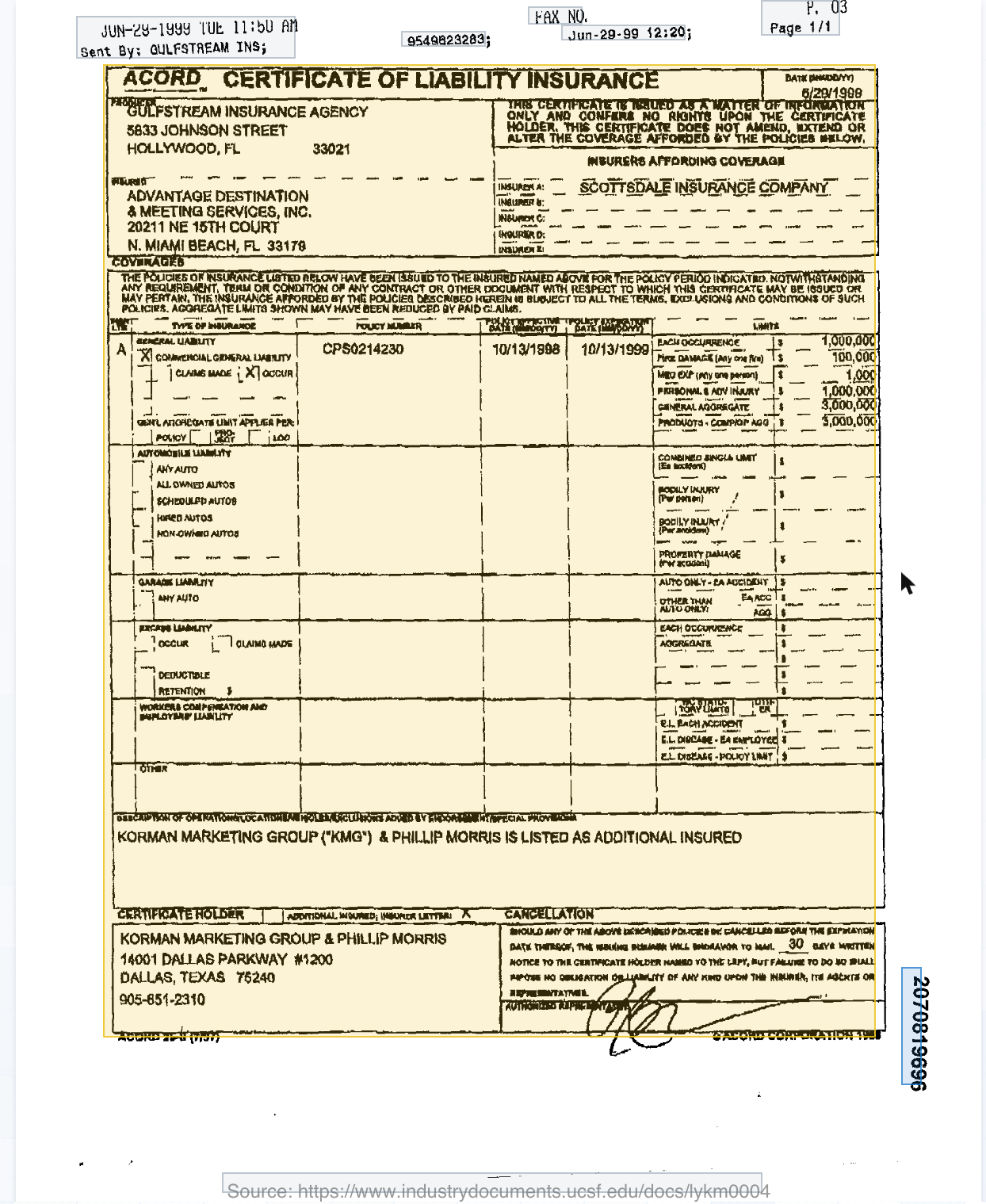
Pulse output on a faxed 1999 ACORD certificate, with the form, fax header, and Bates stamp detected as separate regions
Run through Pulse with a schema for the producer, insured, certificate holder, insurers, and policies, the policy number, both policy dates, and the each-occurrence limit came back cited to their cells with confidence between 0.96 and 0.97. The insurer name, which sits on the most degraded line of the page, came back at 0.86 with no cell citation.
Under the rules above, an agent checking this certificate against a contract requirement would be allowed to compare the policy dates and limit automatically, and would be stopped on the insurer name until a person had confirmed it against the highlighted region. The agent does not have to judge whether the scan is trustworthy. The extraction result tells it which values are.
With these in place, the agent’s behavior is easy to reason about: it reads through a defined tool, it acts only on validated data, and every value it used can be traced to a region on a page.
Related reading
- What Are the Hidden Costs of Building Document Extraction?
- How to Evaluate Enterprise Document AI Alternatives
- Pulse vs LlamaParse
- Pulse vs Unstructured