A document extraction integration that works on ten files in a notebook can fail in production for reasons unrelated to parsing quality: a five-hundred-page filing hits a timeout, a spreadsheet arrives where a PDF was expected, or an answer cannot be traced to a page. This guide sets out a five-step workflow for developers, from sizing the workload to returning a cited answer from a RAG application. It uses Pulse’s document vision pipeline as the worked example, and each step is written so that it can be applied to any parser under evaluation.
Set workload requirements
Define the operating envelope before comparing tools, since many shortlists fall apart on limits and not on accuracy.
Record four numbers:
- Daily page volume, average and peak.
- Maximum document length, in pages and megabytes.
- Timeout tolerance, meaning how long a caller can wait for one document.
- Completion behavior, whether results are polled, pushed to a webhook, or written to storage.
Then check each candidate’s documentation for the following, and note the source for every answer:
- Asynchronous processing: Jobs can be submitted and collected later.
- Webhooks: Completion can be pushed to your endpoint.
- Batch submission: Many files can be queued in one request.
- Page and size limits: Stated maximums per request and per file.
- Timeouts: What happens to a long document.
- Throughput: Documented rate limits and how they are raised.
For Pulse, the documented behavior is asynchronous processing with webhooks, batch extraction from a list of URLs or an S3 prefix, direct uploads up to 100 MB with larger PDFs and TIFFs accepted by URL, page ranges for long documents, and no page limits on either plan, with higher rate limits on Enterprise.
Finish this step with a load test design. If the target is a million pages a day, that is roughly twelve pages a second sustained, and considerably more at peak. Plan a test that ramps to that rate with realistic documents, and measure queue depth, completion time at the 95th percentile, and error rate, so capacity is established by measurement.
Plan document ingestion
The second step is deciding what enters the pipeline and how it is separated. Real inputs include many formats beyond PDF, such as Word files, spreadsheets, and HTML.
Build an inventory:
- File formats, including scanned images and office documents.
- Spreadsheet types, with attention to hidden sheets, formulas, and merged ranges.
- Languages and scripts, including any right-to-left or CJK content.
- Mixed bundles, where one file contains several document types.
Then define two stages ahead of extraction. A separation stage divides a bundle into its component documents, and a classification stage labels each one so it is sent to the right schema. Pulse provides Split and Classify endpoints for these stages, and its layout-aware understanding keeps document structure intact while they run.
Test spreadsheets as carefully as PDFs. Pulse parses Excel workbooks with options for hidden rows, columns, and sheets, raw values, and cell formatting, and whichever parser is used, confirm how it treats those cases, because a hidden column that silently disappears is hard to notice later. For multi-language documents, check per-language results on your own samples. Pulse’s current model was trained on a corpus spanning more than 100 languages.
Specify extraction outputs
Work backwards from what downstream systems need. Parsed output usually takes one of two forms, Markdown or structured JSON, and the choice between them is a design decision:
- LLM-ready Markdown suits retrieval and summarization, where a model reads the content.
- Schema-based JSON suits systems of record, where typed fields are written to a database.
- Both is common, with Markdown indexed for retrieval and JSON stored for exact values.
If answers must cite their source, or if people review low-confidence fields, add two requirements:
- Bounding boxes, so an application can highlight the exact region a value came from.
- Per-field confidence, so a review queue can be driven by a threshold.
Check that each candidate documents user-defined schemas, bounding boxes, confidence scores, and Markdown output. Pulse returns Markdown, HTML, and structured JSON, with bounding boxes at the block, table-cell, and word level and a 0 to 1 confidence score on every element. Its Extract endpoint applies a JSON Schema you define and returns a citation for each field pointing to the source text element or table cell. For tables, its table structure recognition preserves merged cells and multi-level headers, which is the part of the output specification that is hardest to retrofit.
Run a representative pilot
Test the shortlist on real conditions before committing. Check first whether each candidate has a free trial or self-serve tier, since that determines whether the pilot can begin today. Pulse’s Self Serve plan is free up to 20,000 credits and includes the Playground and the API.
Assemble a pilot set that includes:
- native and scanned PDFs, including the worst scans you receive
- spreadsheets
- at least one very long filing
- mixed bundles
- documents in every language you support
Run every document through each of the document parsing tools on the shortlist, and record the same measures for all of them:
- Extraction quality: Field accuracy against prepared answers, and table structure checks.
- Processing time: Median and 95th percentile per document.
- Limits encountered: Page limits, size limits, timeouts.
- Batch behavior: Whether large submissions complete and how failures are reported.
- Review effort: Share of fields below your confidence threshold.
Specialized OCR is what gets tested hardest by the poor scans, so weight those results accordingly.
Integrate with the application
With a parser selected, build the production path.
- Confirm SDK support. Check that the official SDKs cover your languages and are current. Pulse provides Python and TypeScript SDKs, a CLI, and an MCP server.
- Handle credentials and failures. Wiring up a parser starts with its API key, as one developer’s test of five parsers shows. Store keys in a secrets manager, add retries with backoff for transient errors, and verify webhook signatures.
- Connect to the RAG framework. Load the Markdown or JSON output into the ingestion stage of LangChain or LlamaIndex. Pulse supports semantic chunking, and its documentation includes a LangChain ingestion example and a guide to vector metadata.
- Carry provenance through. Store the document ID, page number, and bounding box as metadata on every chunk, so the retriever returns them with the text.
- Verify end to end. Ask a question whose answer sits in a table deep in a long document, and confirm that the response includes a citation that resolves to the right page and region.
Example: parse, extract, and read a cited value
The calls below follow the Pulse quickstart for the Python SDK. The first parses a document from a URL, the second applies a schema to that parse, and the third reads the result.
pip install pulse-ai
export PULSE_API_KEY="your-api-key"
import os
from pulse import Pulse
client = Pulse(api_key=os.environ["PULSE_API_KEY"])
job = client.parse.run(
file_url="https://example.com/remittance-statement.pdf",
config={"model": "ultra-2"},
)
parse_id = job.parse_id
job = client.extract.run(
parse_id=parse_id,
config={
"input_schema": {
"type": "object",
"properties": {
"check_amount": {"type": "number"},
"line_items": {
"type": "array",
"items": {
"type": "object",
"properties": {
"production_date": {"type": "string"},
"owner_decimal_interest": {"type": "number"},
"owner_net_value": {"type": "number"},
},
},
},
},
}
},
)
extraction = client.extract.get_result(job.extract_id)
print(extraction.extraction.enriched)Run against a royalty remittance statement with eight-decimal ownership interests and trailing minus signs, that schema produced the output below. Each field comes back as a value, a citation, and a confidence score, and the citation names the parse element and table cell the value was read from.
{
  "check_amount": {"value": 105.18, "citation": [{"element_id": "Text-76"}], "confidence": 0.981},
  "line_items": [
    {
      "production_date": {"value": "03/2013", "citation": [{"element_id": "Table-77", "sub_element_id": "Table-77-r6c0"}], "confidence": 0.965},
      "owner_decimal_interest": {"value": 0.01043693, "citation": [{"element_id": "Table-77", "sub_element_id": "Table-77-r6c10"}], "confidence": 0.995},
      "owner_net_value": {"value": 19.67, "citation": [{"element_id": "Table-77", "sub_element_id": "Table-77-r6c15"}], "confidence": 0.975}
    }
  ]
}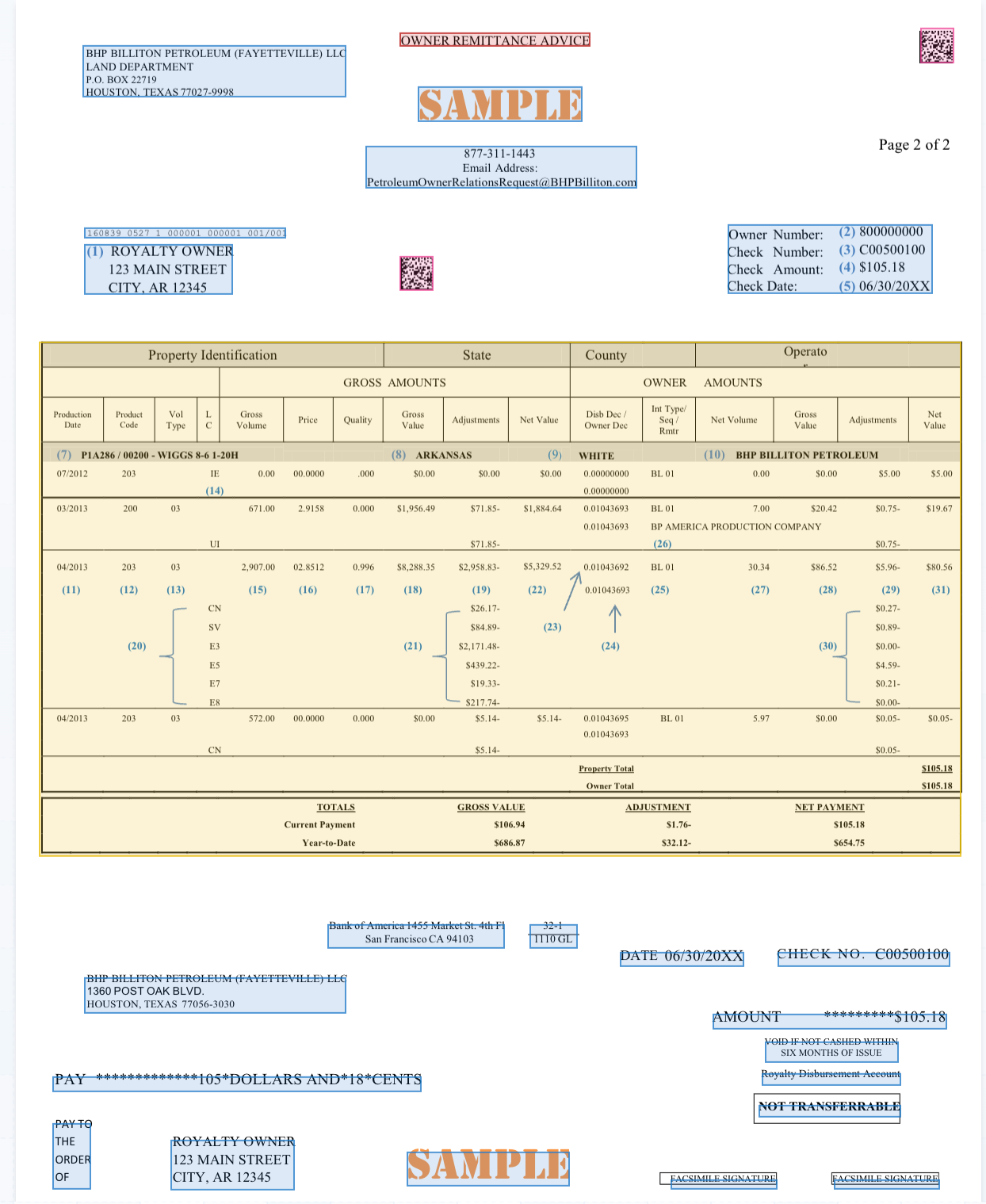
The parsed statement in the Pulse Platform, where each cited element can be traced to its region on the page
For long documents, the same parse call can be sent asynchronously and its job polled or delivered to a webhook. The element identifiers in the citations are what step 4 stores as chunk metadata.
The end-to-end check in step 5 is the acceptance test for the whole pipeline. If a question about a specific figure returns the figure together with a traceable source location, every earlier stage has done its job.
Related reading
- How to Connect Document Extraction to an AI-Agent Workflow
- What Are the Hidden Costs of Building Document Extraction?
- Pulse vs Reducto
- Pulse vs Extend