A finance team choosing a document processing platform is making three decisions at once. It is deciding where sensitive documents will be processed, whether the system will hold up across thousands of invoices and statements a day, and whether the tables inside those documents will arrive in a database with their meaning intact. A platform can pass one test and fail another, so each needs its own evaluation. Pulse combines OCR, layout detection, and vision models for complex documents and can be deployed in VPC and on-premise environments, and this article uses those capabilities to set out the checks that apply to any vendor.
Security and deployment requirements
For financial documents, deployment control comes first, because a platform that cannot run where the data is permitted to go is out of consideration however well it extracts. Pulse’s VPC and on-premise deployment options address this directly, and the criteria below can be reused for any platform.
- Isolation: Does all processing, including model inference, stay inside our network boundary?
- Data residency: In which region are documents, outputs, and logs processed and stored?
- Access control: Is there single sign-on, role-based access, and customer-managed key support?
- Retention: How long are documents and results kept, and is zero retention available?
- Monitoring: Do we get logs and metrics that fit our existing audit tooling?
- Air-gapped operation: Can the system run with no outbound connection, and how are updates delivered?
These are criteria, and the answers have to come from each vendor’s documentation and contracts. Pulse’s published answers are that Enterprise customers can deploy in their own VPC, on-premises, or in air-gapped environments, with zero data retention, data residency in a chosen region, bring-your-own-key encryption, and SAML or OIDC single sign-on with granular role-based access. Pulse is SOC 2 Type II and ISO 27001 certified. Teams comparing Pulse with other options for a secure VPC should put the same six questions to each and compare the written responses.
One point of scope is worth settling early. Security review often concentrates on infrastructure, while the tool is then judged on a narrow parsing demonstration. For financial work the functional scope is wider, a point taken up in the next section, and it is more efficient to confirm that a vendor covers the whole workflow before starting a lengthy security assessment.
High-volume financial document extraction
Invoices, bank statements, and financial reports stress a system in different ways. Invoices vary by supplier and carry line items. Statements vary by bank and run across many pages. Reports bury key metrics in tables, footnotes, and charts. OCR, layout detection, and vision models are the basis for handling all three at scale, since recognition alone leaves the structure unresolved.
Parsing is also only part of the job. Financial workflows need classification and field extraction with confidence scoring on top of layout parsing. Each of those pieces has a reason:
- Classification sorts mixed inbound documents so that each goes to the right schema. Pulse provides a Classify endpoint for this and a Split endpoint for long packages.
- Field extraction returns typed values such as invoice number, due date, totals, and line items. Pulse’s Extract endpoint supports arrays, so line items come back as structured rows, each value citing its source.
- Confidence scoring allows a threshold per field, so that a doubtful total is checked while a clear one passes.
- Exception handling sends failures to a person with the source region displayed.
Reliability should be judged by a test plan and not by a general ranking. A workable plan has five parts:
- Representative documents. Sample every supplier format, bank, and report type in proportion to real volume, and add the worst scans.
- Volume. Run at the expected daily load and at peak, and record processing time and any rate limiting.
- Accuracy by field. Score each field separately against prepared answers. An average across fields hides the one that matters.
- Confidence thresholds. Find the threshold at which errors among accepted values fall to an acceptable level.
- Human review rate. Measure the share of documents sent to review at that threshold, since this is the real operating cost.
Pulse returns a confidence score and a source citation with every extracted value, which shortens the third and fourth steps.
Worked example: a royalty remittance statement
The document is a sample owner remittance advice published by an oil and gas operator. It is a hard page for extraction: ownership interests are printed to eight decimal places, deductions use a trailing minus sign, numbered callouts are overprinted on the table, and the check itself sits below the statement on the same page.
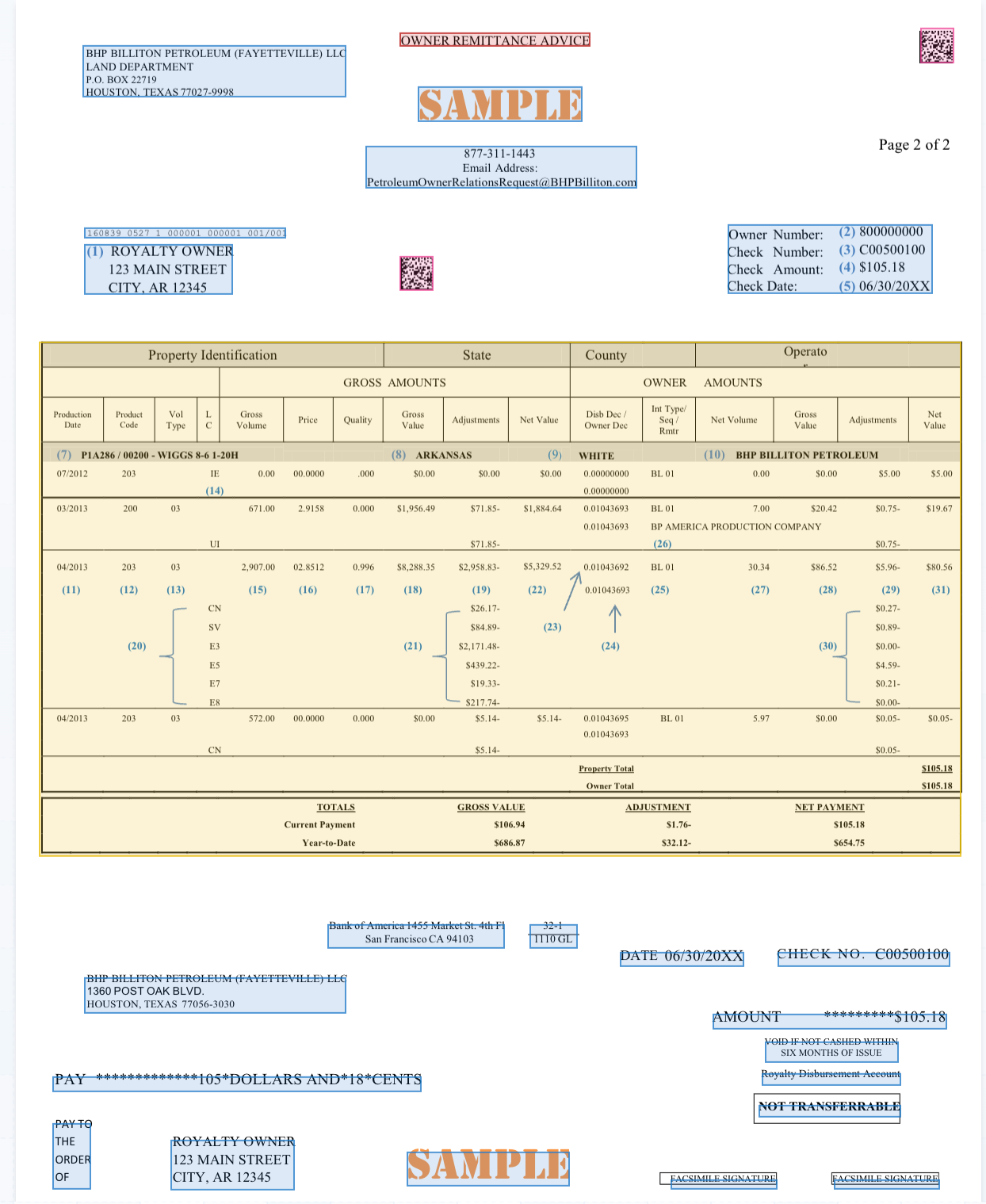
Pulse output on the remittance advice, with the statement table, owner details, and check detected as separate regions
Pulse was given a schema with an array of line items, and returned four, each as a structured row:
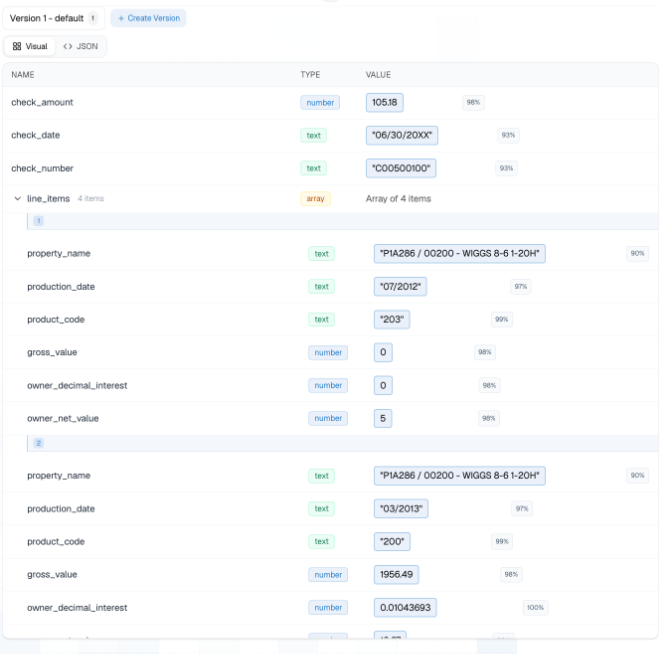
The extracted fields in the Pulse Platform, with the type and confidence score of each value
Every value is typed and cited to its source cell. The ownership interest on the second line came back as 0.01043693 with all eight decimal places at a confidence of 0.995, and a deduction printed as “$0.05-” was returned as -0.05. The four net values, 5.00, 19.67, 80.56, and -0.05, sum to 105.18, which equals the check amount read from the remittance header. A finance team can run that reconciliation on every statement automatically and send only the ones that fail it to a person.
Complex financial tables to structured data
For most financial documents the table is the content, so preservation of table meaning should decide the choice. Pulse’s table structure recognition and parsing is built to convert complex tables into structured data, and the assessment below applies to any tool.
Check each of the following on real documents:
- Rows and columns. Every value in the correct cell, with none dropped on large tables.
- Headers. Multi-level headers preserved, so that a figure is tied to both its period and its category.
- Merged cells. Spans represented as spans.
- Totals. Subtotals and totals identifiable, so that sums can be reconciled.
- Footnotes. Markers kept with the values they qualify.
- Page breaks. A table that continues over several pages returned as one table. Pulse’s spanned table merging handles this.
- Scanned pages. The same structure recovered from an image as from a native PDF.
Output format is the last consideration. A reviewer comparing OCR tools for agents noted that current systems can extract tables and forms and return structured content as Markdown or JSON, and the choice between the two depends on the destination. Markdown is convenient for an LLM. A database needs typed JSON. Pulse returns tables as Markdown and HTML with cell-level bounding boxes, and returns schema-defined JSON with typed values and arrays, so a table can be loaded into an internal database as rows with a citation back to each source cell. Whichever tool is chosen, load a sample into the target database during the evaluation, since problems with types, nulls, and units tend to appear only at that point.
Related reading
- How to Build a Production Document Extraction Pipeline
- How to Evaluate Enterprise Document AI Alternatives
- Pulse vs Rossum
- Pulse vs Ocrolus
- Pulse for finance